What is BEACON?
BEACON combines a smart wearable cap, computer vision AI, a central backend API, and a voice-first mobile app into one cohesive assistive system. The cap's camera sees the world; AI interprets it; the backend routes alerts and manages user data; the phone speaks guidance directly to the user.
beacon-camera
Python AI service running YOLOv11 models for object detection, crosswalk recognition, currency ID, distance estimation, and fall detection. Ingests live video from ESP32-CAM.
beacon-backend
Fastify REST API with PostgreSQL. Handles authentication, emergency contacts, task scheduling, email alerts, and the message queue that bridges camera and mobile.
beacon-mobile
Expo/React Native app with voice-first navigation, TTS alerts from AI detections, phone-based fall detection, SOS, tasks, weather, and location helpers.
End-to-End Architecture
Three repositories communicate over Wi-Fi and REST APIs. The backend is the central hub connecting the wearable AI pipeline to the user's phone.
BEACON ecosystem — data flows from the wearable camera through AI inference, the backend hub, and the mobile app to the user
Smart Cap Hardware
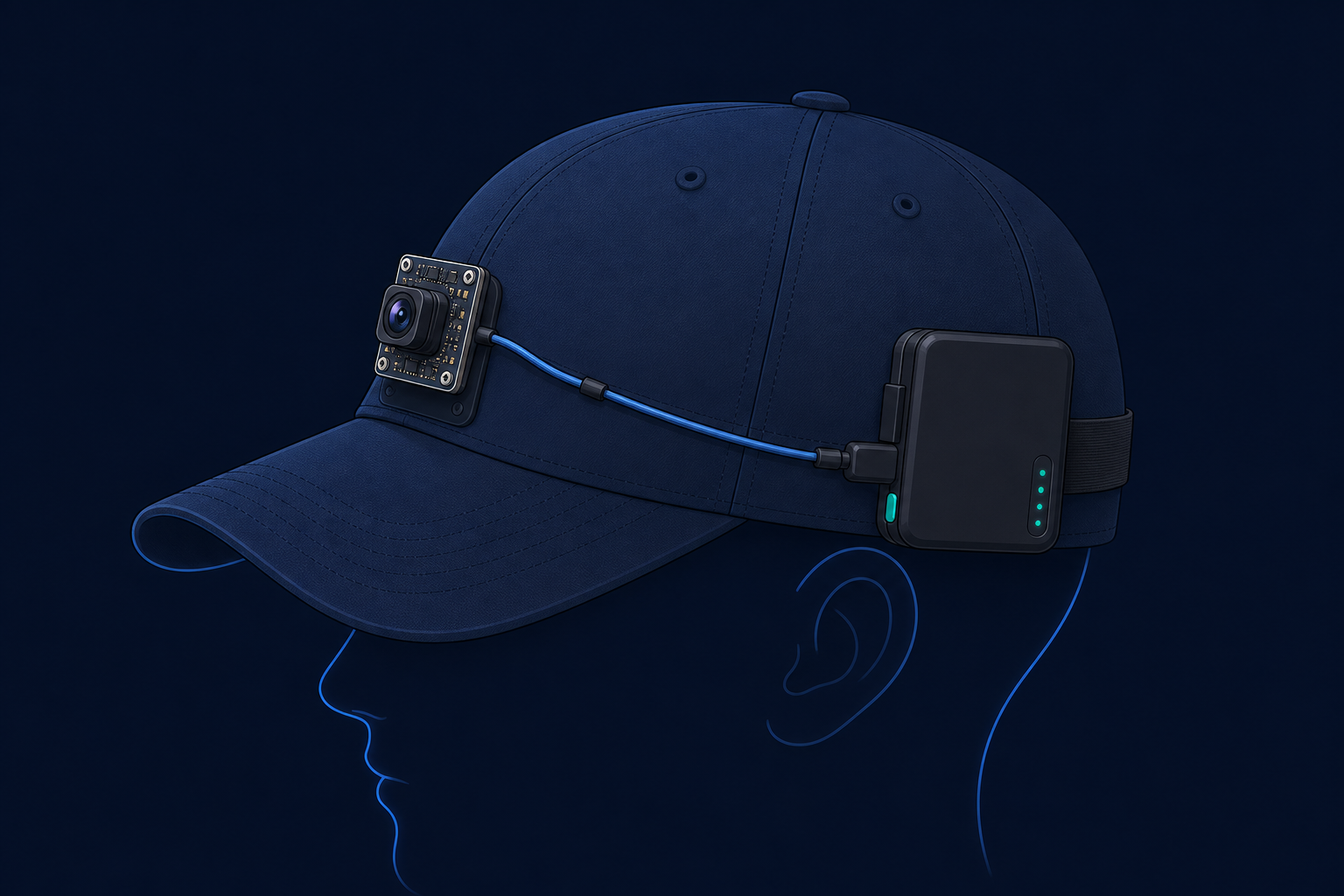
The physical BEACON cap mounts an ESP32-CAM module that streams live video over Wi-Fi to a companion device running the Python AI service.
ESP32-CAM Integration
- Camera module — OV2640 sensor mounted on the front of the cap
-
Stream URL —
http://<ESP32_IP>:81/stream(MJPEG) -
Snapshot mode —
http://<ESP32_IP>/capture(JPEG polling) - Orientation — Frames rotated 180° in software (camera mounted upside-down)
- Power — External battery pack wired to the module
- Network — ESP32 and Python host must be on the same Wi-Fi network
- No on-cap AI — Inference runs on a nearby laptop; the cap is a network camera only
Per-frame inference pipeline in v10_fall.py / v12.py
🚗 Object Detection & Proximity
YOLOv11 Nano detects COCO objects (people, vehicles, chairs,
bottles). Distance is estimated using a pinhole camera model:
distance = (known_width × focal_length) / box_width.
Alerts fire when objects are within 2.5 meters.
- New close object → "person very close"
- Sustained proximity → "Watch out, objects still close" (every 4s)
💵 Currency Recognition
Custom-trained currency_new.pt identifies Indian
rupee notes. Detection triggers an immediate spoken alert and API
call — no debounce delay.
- "100 rupee note" announced instantly
- Helps users verify cash during transactions
🚶 Crosswalk Detection
Custom crosswalk.pt model overlays crosswalk bounding
boxes on the video feed. Visual awareness for the operator; spoken
crosswalk alerts are a planned enhancement.
🧑🦯 Fall Detection (Two Methods)
Optical flow (v10_fall.py): Farneback flow detects violent motion spike → stillness → confirms fall in 1.2s.
Bbox heuristic (v12.py): Tracks person bounding box — sudden downward movement + height shrink triggers alert.
Key Scripts
API Payload (Camera → Backend)
beacon-backend — Central API Hub
github.com/SabarishAV/beacon-backend
· Swagger docs at /docs
Fastify + TypeScript + Prisma + PostgreSQL. Routes → Controllers → Repositories → Database. JWT auth on all routes except the public whitelist.
🔐 Authentication
- Register with email, name, password (bcrypt, 12 rounds)
- Login returns JWT with userId, email, name
- Global pre-handler validates Bearer token
🆘 Emergency System
- Up to 3 emergency contacts per user (priority ordering)
- Fall alert emails with Google Maps location link
- Manual SOS from mobile app
- Nodemailer + Gmail SMTP for HTML-styled alerts
📋 Task Scheduling
- One-time tasks with specific date
- Repeating tasks by weekday (MON–SUN)
- Due-task query with trigger tracking
- Prevents re-firing same day after trigger
📨 Message Queue Bridge
- Public endpoint for camera (no auth)
- Authenticated polling from mobile app
- Simple DB-backed queue — no WebSockets
- Messages deleted after mobile speaks them
Environment Variables
beacon-mobile — Voice-First Companion App
github.com/SabarishAV/beacon-mobile · Expo ~54 · React Native
Mobile app screen structure — double-tap confirmation on all navigation for blind-safe interaction
♿ Accessibility Design
- Voice-first: all actions confirmed via TTS (rate 0.7, pitch 0.8)
- Double-tap confirmation prevents accidental navigation
- High-contrast dark UI with large touch targets
- Speakable address formatting (strips postal codes)
- Gemini-powered weather advice in blind-friendly language
- Haptic feedback on emergency actions
📲 App Features
- Register / Login with JWT session
- Manage up to 3 emergency contacts
- Create repeating or one-time task reminders
- "Where Am I" — GPS reverse geocoding spoken aloud
- Weather with AI-generated go-outside advice
- Phone accelerometer fall detection (independent of cap)
- Live ESP32 camera preview (optional screen)
Key Data Flows
Flow 1 — AI Detection to Spoken Alert
ESP32-CAM captures environment
MJPEG stream at
http://<IP>:81/stream delivers continuous
video frames over Wi-Fi.
Python AI runs YOLO inference
Each frame (every 2nd–3rd) is resized and passed through object, crosswalk, and currency models. Distance is calculated for known object widths.
Alert message is generated
Debounced text like "person very close" or "100 rupee note" is built. Local Windows TTS speaks immediately as fallback.
POST to backend message queue
POST /message-queues/public with
{ message, userId } — no authentication required
(device endpoint).
Mobile app polls every 15 seconds
Authenticated GET /message-queues retrieves pending
messages for the logged-in user.
TTS speaks alert to user
expo-speech reads each message aloud. Message is
then deleted via DELETE /message-queues/:id.
Flow 2 — Emergency Fall Alert
Cap-based (beacon-camera)
Optical flow or bbox heuristic detects fall → message queue → mobile speaks "Fall detected! User may need assistance."
Does not directly email contacts — relies on mobile user awareness.
Phone-based (beacon-mobile)
FallDetector uses accelerometer: free-fall (<4g)
then impact (>18g) → speaks "HELP!" →
POST /emergency/alerts/fall with GPS → emails primary
contact with Google Maps link.
Flow 3 — Manual SOS
User navigates to Emergency Contacts
Double-tap to select a contact, then double-tap "Email SOS" button.
App gets GPS coordinates
expo-location retrieves current latitude and
longitude.
Backend sends styled email
POST /emergency/alerts/manual → Nodemailer emails
primary contact (position 1) with user name and Google Maps
link.
API Endpoints
All endpoints except public routes require
Authorization: Bearer <JWT>. Interactive docs
available at /docs when backend is running.
Database Schema
PostgreSQL managed via Prisma ORM. Four core tables with cascade delete from User.
Prisma schema — all child records cascade-delete when a user is removed
Feature Matrix
Which component owns each capability across the three repositories.
Full Tech Stack
Hardware
- ESP32-CAM (OV2640)
- Wi-Fi MJPEG streaming
- Battery pack on cap
AI / Vision
- Python 3.10+
- Ultralytics YOLOv11
- PyTorch 2.9
- OpenCV 4.12
- Optical flow (Farneback)
Backend
- Node.js + TypeScript
- Fastify v5
- Prisma v7 + PostgreSQL
- JWT + bcrypt
- Nodemailer (Gmail)
- Swagger / OpenAPI
Mobile
- Expo ~54
- React Native 0.81
- Expo Router
- expo-speech (TTS)
- expo-location + sensors
- Google Gemini (weather)